
【题目】________ the computer competition quite well, he won the first prize.
A. Preparing B. Having prepared
C. To prepare D. Prepared
 第1卷单元月考期中期末系列答案
科目:高中英语 来源: 题型:
【题目】假定英语课上老师要求同桌之间交换修改作文,请你修改同桌写的以下作文。文中共有10处语言错误,每句中最多有两处。每处错误仅涉及一个单词的增加、删除或修改。
增加:在缺词处加一个漏字符号(∧),并在其下面写出该加的词。
删除:把多余的词用斜线(\)划掉。
修改:在错的词下划一横线,并在该词下面写出修改后的词。
注意:1. 每处错误及其修改均仅限一词;
2. 只允许修改10处,多者(从第11处起)不计分。
People always say that we lack of the eyes of realizing the beauty in life. I can’t agree complete. Last Friday, I woke up very early and decide to take a walk. In the square there many senior citizens were dancing, I found several elders bury in feeding birds. Without many cars, I realized the city looked so clean but beautiful. Some coffee shops were decorated pretty well, which attracted our eyes. The whole city was covered with green trees, making it green city. At this moment, I found the city was so interested. How I regret ignore its beauty before!
查看答案和解析>>
科目:高中英语 来源: 题型:
【题目】—Excuse me, Tom. How many miles is five kilometers?
—Sorry. _______
A. It all depends. B. You know.
C. Let me see. D. You’ve got me there.
查看答案和解析>>
科目:高中英语 来源: 题型:
【题目】假定英语课上老师要求同桌之间交换修改作文,请你修改你同桌写的以下作文。文中共有10处语言错误,每句中最多有两处。错误仅涉及一个单词的增加、删除或修改。
增加:在缺词处加一个漏字符号(∧),并在其下面写出该加的词。
删除:把多余的词用斜线(\)划掉。
修改:在错的词下划一横线,并在该词下面写出修改后的词。
注意:1.每处错误及其修改均仅限一词;
2.只允许修改10处,多者(从第11处起)不计分。
Last Saturday,I went on journey by train.There were such many passengers that not everyone could get a seat.Many people had to stand,which was really tired.I had a reserved seat so I could sit comfortable.In front of my seat is a woman with two little kids.With the kid squeezing into their single seat,she had to stand up all the way.So I moved a bit but shared my seat with her.The woman felt very grateful to my selflessness.Seeing her beautiful smile,I also smiled.Share increased happiness!
查看答案和解析>>
科目:高中英语 来源: 题型:
【题目】Every room in our school is ________with a colour TV set.
A.supplied
B.given
C.offered
D.burnt
查看答案和解析>>
科目:高中英语 来源: 题型:
【题目】Cropping (修剪) an Image With the Snap Shot Program
Welcome to the world of photo-editing!
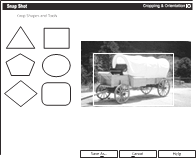
Cropping an image allows you to zero in on (对准,聚焦) just the portion that is important to your project. For example, you may want to insert an image of a covered train in a report but may not want to include the whole train. Cropping the image allows you to select only the small area you wish to retain (保留) and eliminate all other portions of the original picture.
Option 1: Cropping by Placing the Image in a Shape
Screen Shot 1
Using one of Snap Shot’s standard shapes as a photo-editing tool requires no special abilities. To crop an image with a standard shape:

a. Click Cropping & Orientation from the Effects menu.
b. Click to select one of the six shapes to frame your image.
c. Use the mouse pointer to draw a frame around the portion of the image you wish to retain. Re-size the frame by dragging the shape’s sizing handles. When you are satisfied with the results, click Cut It.
d. Snap Shot will automatically return to the project that is open. (You may also copy or cut the cropped image and paste it into another application.)
Option 2: Freehand Cropping of an Image
Screen Shot 2
If you want to trace the shape of an object in order to crop out everything else, freehand cropping is the way to go. To crop an image freehand:
a. Click Freehand Crop from the Cropping & Orientation option on the Effects menu.
b. Using the mouse pointer, trace around the shape you want to crop. Be sure to completely enclose the image by ending at the same place you began outlining.
c. Click Cut It. Snap Shot will automatically return to the project that is open.
【1】The main purpose of the passage is to ______.
A. describe the features of Snap Shot
B. explain how to use Snap Shot to select sections of a picture
C. show that Snap Shot is an easy tool to use
D. discuss how to use the features of Snap Shot
【2】To perform Option 2, one should first ______.
A. select the image
B. use the mouse pointer to draw a frame
C. select Cropping & Orientation from the Effects menu
D. re-size the frame by dragging the sizing handles on the shape
【3】Why is freehand cropping discussed after cropping with shapes?
A. To introduce a simpler technique before moving on to a more complex one.
B. To proceed from a more useful technique to one with fewer practical applications.
C. To order the options alphabetically.
D. To arrange the text, making space for the screen shots.
查看答案和解析>>
科目:高中英语 来源: 题型:
【题目】假设你是红星中学高三学生李华。请根据以下四幅图的先后顺序,给学校英文报投稿,记述学校法制宣传周期间的系列活动。
注意:1. 词数不少于60
2. 开头已给出,不计入总词数。
提示词:模拟法庭 moot court
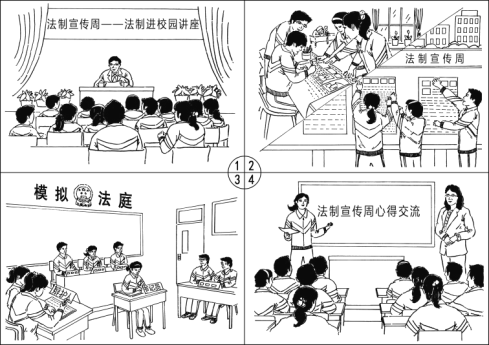
Legal Awareness Week was opened in our school. A series of activities were carried out.
_________________________________________________________________________________________________________________________________________________________________________________________________________________________________________________________________________________________________________________________________________________________________________________________________________________________________________________________________
查看答案和解析>>
科目:高中英语 来源: 题型:
【题目】假设你是红星中学高三学生李华,请根据以下四幅图的先后顺序,介绍你组织戏剧社成员排演《雷雨》参加学校戏剧节的全过程,并以 “Putting Thunderstorm on the School Stage”为题,给校刊“英语角”写一篇英文稿件。词数不少于60。
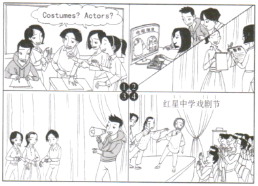
Putting Thunderstorm on the School Stage
_______________________________________________________________________________________________________________________________________________________________________________________________________________________________________________________________________________________________________________________________________________________________________________________________________________________________________________________________________________________________________________________________________________________________
查看答案和解析>>
科目:高中英语 来源: 题型:
【题目】The purpose of new technique is to make life easier,________it more difficult.
A.not make
B.not to make
C.not making
D.do not make
查看答案和解析>>
湖北省互联网违法和不良信息举报平台 | 网上有害信息举报专区 | 电信诈骗举报专区 | 涉历史虚无主义有害信息举报专区 | 涉企侵权举报专区
违法和不良信息举报电话:027-86699610 举报邮箱:58377363@163.com
